Intercom
Switching From Zendesk to Intercom: What Actually Changes for Your Support Team
A practical look at what actually happens when you move from Zendesk to Intercom, from migrating tickets and help content to rebuilding automation around Fin AI.
Written by Nevil Paul
Published on September 16, 2026 · 5 min read

Switching From Zendesk to Intercom: What Actually Changes for Your Support Team
Every few weeks a founder or support lead asks some version of the same question: they've outgrown Zendesk, or they want an AI agent that actually resolves tickets instead of just routing them, and they want to know what a move to Intercom really involves. The honest answer is that most of your data can come with you, but the way your team works day to day shifts more than people expect, especially once Fin AI enters the picture.
Why teams start looking at Intercom
The two platforms solve the support problem from different angles. Zendesk was built around the ticket queue: structured fields, SLAs, and rule-based routing that keeps a large, multi-channel team organized. Intercom was built around the conversation, with automation and AI woven directly into the chat experience rather than bolted on as a backend assist. If your team spends most of its time on live chat and in-app support, and you want an AI agent that can independently close out common requests rather than just suggest a reply to a human agent, that's usually the pull toward Intercom. If you run a large, ticket-heavy operation across email, voice, and social with strict SLA reporting, Zendesk's structure often still fits better. Neither platform is objectively superior, they're built for different shapes of support team.
What actually moves over
The migration itself is more mechanical than people assume. Your customer and user data exports out of Zendesk as a CSV and imports into Intercom as a fresh list, which becomes the foundation for your contact records going forward. Existing tickets aren't stuck either. Intercom's inbox migration tooling is built to pull historical tickets in from Zendesk and a handful of other help desks, so your team isn't starting with a blank history on day one.
Help center content follows a similar path but through a different process. Rather than a flat data export, Intercom connects to your Zendesk account (via an API token or OAuth) and pulls your public articles in directly, preserving the folder and category structure you already built. It also generates redirects from the old article URLs so you don't lose the SEO value those pages built up over time. A few things do need manual attention afterward: some formatting doesn't translate cleanly, and any embedded video has to be hosted on a supported provider (YouTube, Vimeo, Wistia, Loom, and a few others) or it won't carry over.
Help center content is what feeds Fin AI
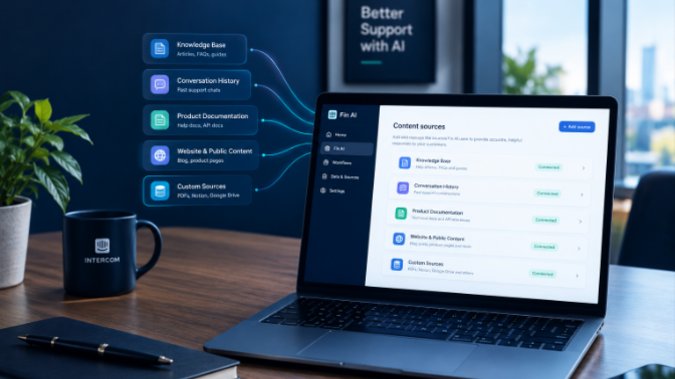
This is the part worth taking seriously if AI resolution is the reason you're switching in the first place. Fin AI Agent doesn't work from some separate knowledge base, it draws directly from the same Knowledge Hub that powers your public help center: articles, snippets, uploaded documents, and any external URLs you point it at. Once your Zendesk articles are imported as Intercom articles, they're immediately available to Fin with no extra setup step. External sources you connect separately (rather than importing as native articles) sync on a slower cycle, so if you're relying on those, expect updates to take longer to reach the AI agent than a direct edit to an Intercom article would.
Practically, this means the migration isn't finished when the import finishes. Before you turn Fin loose on real customers, it's worth reading through the imported articles the way a customer would, checking that formatting held up, that outdated Zendesk-specific language (screenshots of the old widget, references to "tickets" where your new flow says "conversations") has been updated, and that nothing sensitive slipped through without the audience restrictions it had in Zendesk. Fin respects those audience rules, but only if they were rebuilt correctly on the Intercom side.
Rebuilding automation instead of copying it
Zendesk triggers don't transfer one to one, they get rebuilt as Intercom Workflows. Both handle tagging, assignment, and routing based on conditions, but Workflows are built around the messenger and conversation experience rather than a ticket form, which usually means the logic needs to be redesigned rather than just re-entered. The same goes for macros: there's no automated import for these, so canned responses and saved replies typically get copied over manually. It's a good excuse to prune ones you no longer use rather than dragging every old macro into the new system out of habit.
Reporting shifts too. Where Zendesk reporting centers on ticket volume and SLA compliance, Intercom's reporting leans toward conversation-level metrics: response time, resolution rate, and increasingly, how much of that resolution volume Fin is handling on its own versus handing off to a human. If your team has been measuring success purely by ticket throughput, it's worth deciding upfront what the equivalent Intercom metrics should be so you're not flying blind in the first few weeks.
Getting the rollout right
The businesses that switch smoothly tend to do a few things in order: get the team and permission structure set up first, forward support email into Intercom before flipping the switch publicly, migrate and clean up help center content before connecting it to Fin, and only then rebuild automation and reporting around how the new system actually works rather than trying to force Zendesk's structure onto it. Skipping straight to "turn on Fin" without doing that groundwork is the most common reason a new Intercom setup underperforms compared to what the platform is actually capable of.
If you're mid-migration or already switched and Fin still isn't resolving as much as you'd expect, that's usually a knowledge base and configuration problem rather than a limitation of the AI itself. I help businesses get their Intercom and Fin AI setup properly tuned after a switch like this, so if you want a second pair of eyes on your configuration, feel free to get in touch.
Cover photo by Charanjeet Dhiman on Unsplash.
Free checklist
The Fin AI launch checklist
The 12 checks I run before switching Fin on for a client: content, guidance, handoff, testing, and what to watch in the first month. Sent straight to your inbox.
One email, no spam. I only follow up if you reply.
Need help with Intercom? Book a strategy call to get personalized recommendations.
Book a CallLeave a comment
Share your thoughts or questions below.