Intercom
What Fin AI Can Actually Read: Every Content Source It Supports
Fin AI pulls from far more than your Help Center, from internal articles and PDFs to synced websites and imported docs. Here's every content source it supports and how to prioritize them.
Written by Nevil Paul
Published on October 9, 2026 · 6 min read
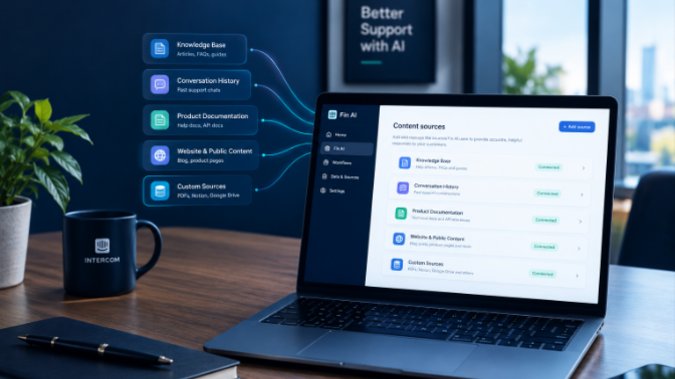
# What Fin AI Can Actually Read: Every Content Source It Supports
Most business owners setting up Fin AI assume it only reads whatever lives in the public Help Center. That assumption shapes a lot of bad setups. It leads teams to dump everything into Help Center articles that customers never needed to see, or to give up on a source entirely because it does not fit the Help Center mold. Fin draws on a wider set of content than that, and knowing the full list changes how you should actually build it out.
## Articles don't need to be public to feed Fin
Fin pulls from public articles, but it also reads internal articles that never touch your Help Center at all. An internal article just needs the Fin toggle switched on in its details panel, and it becomes fair game for Fin to generate answers from, without customers ever seeing it listed anywhere. That matters for anything sensitive, like refund thresholds or account escalation criteria, where you want Fin to know the policy without publishing the policy.
Snippets work the same way but are meant for shorter, more time-sensitive content: a shipping delay notice, a quick answer to a seasonal question, something you will update or retire soon. Both articles and snippets need to be published, not sitting in draft, before Fin can use them. A half-finished draft sitting in your editor contributes nothing, no matter how complete the thinking behind it is.
## Website sync pulls in pages you never wrote as help content
Beyond your own authored content, Fin can sync public URLs: pricing pages, product pages, blog posts, anything publicly reachable. This is useful for pricing and feature questions that live on your marketing site rather than in support docs. The catch is timing. Synced website content refreshes on a weekly schedule, so if you change your pricing page on a Monday, Fin may keep answering with the old numbers until the next sync runs, unless you trigger a manual resync. A small number of very large sites can't be connected this way at all, so this works best for your own domain, not for pulling in competitor or reference pages.
## External platforms can be imported or just synced, and the difference matters
If your team already keeps documentation in Zendesk, Confluence, Notion, or Guru, you don't have to rebuild it inside Intercom from scratch. These platforms support two different connection types, and picking the wrong one causes real confusion.
Import brings the content into Intercom as editable material, so you can tweak it there going forward. Sync keeps the external platform as the source of truth and pulls in a view-only copy that updates automatically whenever the original changes. Salesforce Knowledge, Box, Freshdesk, and Document360 only support the sync option, so content from those stays view-only inside Intercom no matter what.
One detail that trips people up with Zendesk specifically: synced Zendesk articles are not listed anywhere inside Intercom's own Help Center, so your Intercom Help Center needs to actually be live and published for Fin to draw on them. If your Zendesk help center is only partially published, Fin loses access to all of it, public articles included, not just the unpublished parts.
## PDFs get Fin reading your documents directly
You can upload PDF files directly, and the text becomes available to Fin within minutes rather than weeks. This is the cleanest path for product manuals, pricing sheets, or policy documents that already exist as finished files and that you don't want to retype as articles. Uploaded PDFs are treated as a private source: customers never see a link back to the document itself in Fin's answer, only the answer Fin generated from it. That makes PDFs a good fit for internal reference material you want Fin to use without exposing the raw file.
## Why native content still deserves priority
With this many options, it is tempting to treat them as interchangeable. They are not, mainly because of update speed. Content created natively in Intercom, articles and snippets, becomes available to Fin almost immediately after publishing. Synced website content and most external imports update on a weekly cycle at best. If a fact changes often, like pricing, promotions, or anything tied to inventory, native content will keep Fin current far faster than depending on a synced page somewhere else to catch up.
A practical rule: use native articles and snippets for anything that changes regularly or that directly drives support volume, and reserve website sync and external imports for stable reference material that rarely moves.
## Keeping sources from fighting each other
The more sources you connect, the more chances you create for two pieces of content to say slightly different things about the same question, an old PDF that still lists a discontinued plan, a Notion page nobody updated after the pricing changed, a snippet that contradicts the main article. Intercom's Knowledge Hub is where you manage all of this centrally. It lets you see what's feeding Fin and your Help Center at once, organize content into folders, and control, source by source, whether something is available to Fin, Copilot, the Help Center, or some combination of the three.
Treat this as ongoing maintenance, not a one-time setup task. Once a quarter, at minimum, walk through every connected source and ask whether it's still accurate and still needed. A source you connected for a six-month-old product launch is a source that can quietly start feeding Fin outdated answers if nobody remembers to disconnect it later.
## Getting the sequencing right
If you're setting this up for the first time, start with one solid source, your existing Help Center articles are usually the fastest path, get Fin live, and then expand. Adding sources before you have a working baseline just multiplies the places something can go wrong when you're trying to debug a bad answer. Add website sync next if your pricing or product pages carry information your Help Center doesn't, then layer in external imports or PDFs for anything you're not ready to rewrite as native content.
This kind of source mapping, deciding what should live where and how fresh each piece needs to be, is exactly the part of a Fin AI setup that tends to get skipped under time pressure. If you're working through this for your own business and want a second set of eyes on how your content sources are configured, feel free to reach out and I'm happy to help you get it right.
Cover photo by Maksym Kaharlytskyi on Unsplash.
Free checklist
The Fin AI launch checklist
The 12 checks I run before switching Fin on for a client: content, guidance, handoff, testing, and what to watch in the first month. Sent straight to your inbox.
One email, no spam. I only follow up if you reply.
Need help with Intercom? Book a strategy call to get personalized recommendations.
Book a CallLeave a comment
Share your thoughts or questions below.


